Ten Hours, One Tank, Zero Buffering: Engineering the Ultimate Cross-Country Offline Playlist
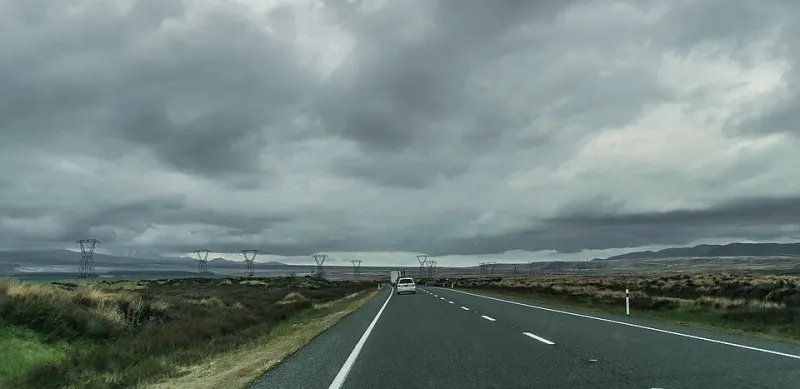
Photo: Krzysztof Golik, CC BY-SA 4.0, via Wikimedia Commons
There's a special kind of silence that happens about 40 minutes outside of Amarillo. It's the sound of your streaming app giving up, the spinning wheel of doom replacing your carefully curated road trip vibes, and your passenger asking if you brought any CDs. Spoiler: you didn't.
That silence is avoidable. Building a proper 10-hour offline playlist isn't just a nice-to-have anymore — for anyone driving America's long stretches of rural highway, it's basically trip insurance. Here's how we do it at Y2MP3 Cloud, segment by segment.
Why Streaming Fails Exactly When You Need It
The math is simple and brutal. Large chunks of I-40 through New Mexico, Highway 50 across Nevada (look up "The Loneliest Road in America" — the name isn't a joke), and big swaths of Route 66 through the Arizona desert sit well outside reliable LTE coverage. Streaming services need a live connection, and when that connection drops, your music drops with it.
Even services with "offline download" features come with strings attached: you have to reconnect periodically to keep your downloads active, storage fills up fast on a phone that's also running maps, and some catalogs simply can't be downloaded at all due to licensing restrictions.
A local MP3 file, on the other hand, plays anywhere. Mountain pass, cornfield, tunnel through the Rockies — it doesn't care. That's the whole appeal of taking your music offline: you own the file, the file plays, end of story.
The Segment-by-Segment Pacing Method
A 10-hour playlist isn't one playlist. It's four or five mini-playlists stitched together with intent. Here's the structure we recommend:
Hour 0–1: The Launch Window. You're still in town, energy is high, everyone's arguing about the snack situation. Keep it upbeat but not exhausting — think driving rock, road-warrior classics, anything under 4 minutes. This segment burns fast and loud.
Hour 1–3: The Highway Cruise. The scenery turns repetitive, so your music should turn hypnotic. Mid-tempo Americana, indie, classic rock deep cuts. This is where longer tracks work — nobody's skipping anything when the view is 90 minutes of farmland.
Hour 3–5: The Afternoon Dip. Post-lunch drowsiness is real and statistically dangerous. Fight it with energy: up-tempo, singalong material, stuff the driver knows every word to. This is not the segment for your ambient folk experiment.
Hour 5–7: The Golden Hour. Sun's dropping low, everyone's mellowed out. Bring back the mid-tempo and nostalgic stuff. This is peak mixtape territory.
Hour 7–10: The Arrival Arc. Gradually build from mellow back to energizing as you approach your destination. End on something triumphant. You just drove 600 miles — you've earned a closer.
Organize Files by Region, Not Just by Mood
Here's a pro tip most playlist guides skip: organize your converted files geographically. Driving Route 66? Load a "Chicago to St. Louis" folder, a "Missouri to Oklahoma" folder, and so on. Hitting the Pacific Coast Highway? Build a dedicated coastal folder with beach-adjacent sounds for the Big Sur stretch.
Why? Two reasons. First, it makes the drive feel scored — the music matches the landscape rolling past your window. Second, it keeps your folder structure manageable. A single 10-hour MP3 dump is a nightmare to navigate at a gas station stop; clearly labeled regional folders take seconds to find.
Naming convention matters too. Something like 01_I40_West_AfternoonDip_Track.mp3 tells you everything you need at a glance. Future you, squinting at a phone screen in a Flagstaff parking lot, will be grateful.
Converting and Storing: Keep It Simple
Once you've settled on your track lists, pulling them offline is straightforward. Tools like the ones we host here at Y2MP3 Cloud let you convert YouTube audio to MP3 files in minutes. A few practical notes:
- Aim for 256kbps or higher if quality matters on your car speakers. Car audio is forgiving, but road noise eats detail — don't start from a low-quality source.
- Budget roughly 60–70MB per hour of audio at good quality. A full 10-hour trip fits comfortably on a couple of gigabytes, so even an older phone or a cheap USB stick handles it.
- Back up to two places. Phone plus USB drive. If one fails in Tulsa, the other saves you.
- Test before departure. Play every segment for 30 seconds the night before. A corrupted file discovered at 6 a.m. in Kansas is a tragedy of your own making.
Route-Specific Flavor Ideas
Match the music to the myth of the road you're driving:
- Route 66: Vintage rock and roll, blues, Chuck Berry and his descendants. The road was basically built to this soundtrack.
- Pacific Coast Highway: Breezy West Coast fare — surf rock, laid-back singer-songwriters. Windows down, mandatory.
- Blue Ridge Parkway: Bluegrass and Appalachian folk. The mountains practically request it.
- Great River Road (Minnesota to Louisiana): Trace the blues north to south, or south to north, as the river does. It's a musical history lesson disguised as a playlist.
The Bottom Line
Streaming is wonderful right up until the moment it isn't, and rural America has a talent for finding that moment. Ten hours of locally stored, thoughtfully paced music costs you maybe an evening of prep work and a few gigabytes of storage. The payoff is a drive where the soundtrack never blinks — no buffering wheel, no dead zones, no awkward silence outside Amarillo.
Build it once, and that playlist lives on your drive for years. That's not just convenience. That's ownership.